
When you need to upload a document for your application or license, you’ll need to start by logging in to the Attachment Warehouse.
For more information about the Attachment Warehouse and how it works, see Get started with the Attachment Warehouse.
Before you begin
Gather the following applicable information: Note: If you are a business entity and have resident licenses in more than one state, you’ll need to select one as your home or resident state. Use your FEIN and firm name as it is listed in the Producer Database or application if this is the first time you are using the Attachment Warehouse.
Log in
- Click one of the following:
- Upload to Background Questions Supporting Documentation
- Upload to Reporting of Actions
- Upload to Additional Licensing Documents
The Attachment Warehouse use agreement opens.
Note: To determine which section of the Attachment Warehouse you should upload documents to, see Get started with the Attachment Warehouse. - Read and accept the Use agreement.
The Attachment Warehouse opens. - Select one of the following:
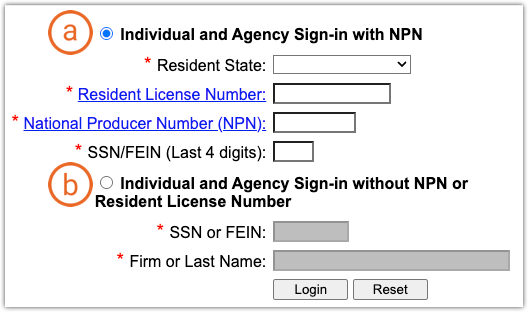
- If you have an existing license and have a National Producer Number (NPN), select Individual and Agency Sign-in with NPN.
- Enter the state of your primary residence or place of business.
Note: This may NOT be the same state you’re uploading documents to. - Enter your resident license number.
- Enter your National Producer Number (NPN).
Tip: Click the linked NPN field label on the login screen to find your NPN. - Enter the last 4 digits of your Social Security Number or the Federal Employer Identification Number.
- If you don’t have any licenses (don’t have an NPN yet), select Individual and Agency Sign-in without NPN or Resident license number.
- Enter your full Social Security Number if you are applying for an individual license or Federal Employer Identification Number if you are applying for a license for your business.
- Enter your last name or the name of your business
Note: Enter this name as it is listed in the Producer Database or on your application if this is the first time you are using the Attachment Warehouse. - Click Login.
The Producer contact details open.
Next steps
Your next step is to upload your documents. The following articles walk you through how to upload documents to each section of the warehouse: