
Upload to the Additional Licensing Documents (ALD) section of the Attachment Warehouse when you need to upload documents such as proof of citizenship, affidavits, and bonds.
For more information about the other sections of the Attachment Warehouse and when to use each one, see Get started with the Attachment Warehouse.
Things to know
Before you begin
Gather the following applicable information: Note: If you are a business entity and have resident licenses in more than one state, you’ll need to select one as your home or resident state. Use your FEIN and firm name as it is listed in the Producer Database or application if this is the first time you are using the Attachment Warehouse.
Step 1: Log in
Log in to the Attachment Warehouse.
Step 2: Verify producer contact details
Verify the Producer contact details: If this is your first time using the Attachment Warehouse: Click Edit. Enter your business phone number and email address. Click Update. Click Continue. If the producer information shown is correct, click Continue.
Click Add New Document.
If prompted, read and accept the Individual Producer agreement.
Select one of the following: If you are attaching documents for yourself or your business, select Producer. If you are submitting documents on behalf of somebody else, select Producer’s Authorized Submitter and complete the form that appears. Click Continue.
The Document submission page opens. Any previously uploaded documents are shown.
The Individual Producer Attachment screen opens.
The Producer/Authorized Submitter screen appears.
The Upload New Document screen opens.
Step 3: Upload documents
- Select the Document Type:
Note: Contact your state with any questions about the following documents. - Fingerprint Receipt – Sometimes a state may require you to upload your fingerprints instead of having the fingerprint vendor submit them to the State. Check your state’s requirements.
- Proof of Bond/Proof of Financial Responsibility – This document shows that your or your business has the financial capacity to cover potential liabilities.
- Proof of Legal Status/Work Eligibility – This is usually a valid photo ID that proves your ability to work in the United States, which is required by some states. Examples: State driver’s license, passport, Permanent Resident Card, or Green Card
- Proof of Name Change – This is necessary when you submit a legal name change (demographic update) for your license. Examples: Marriage license, divorce decree, or court order
- Proof of Secretary of State Registration – This is a document that shows your business is registered with your state’s Secretary of State office. Examples: Certificate of Good Standing or Certificate of Status.
- State Criminal Background Report – This document is proof that you've had a background check, which helps protect consumers from fraud.
- Other – This document type is used for any other documents that are not covered by the previous options.
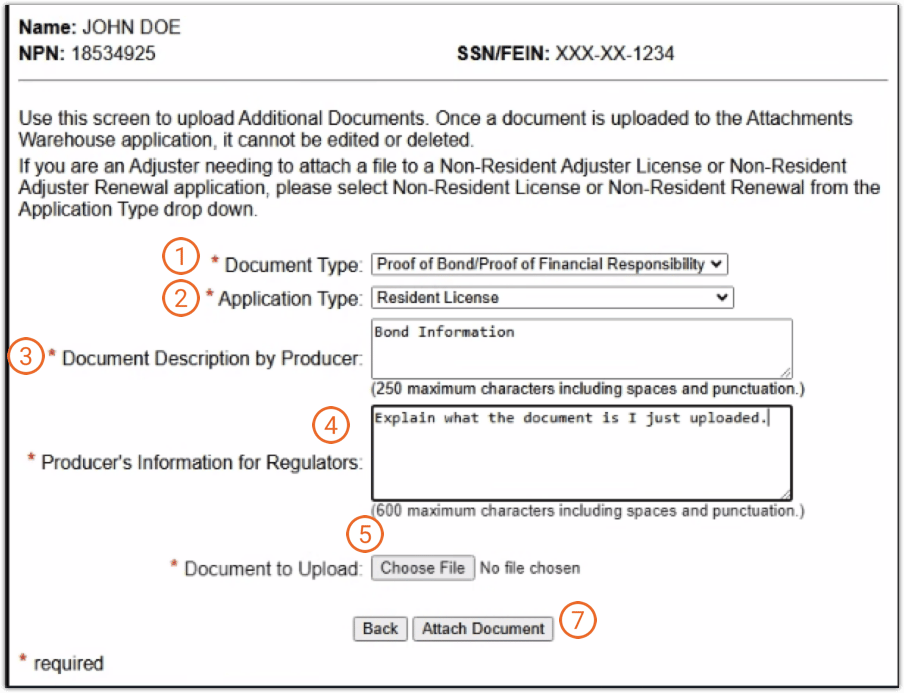
- Select the Application Type.
- In Document Description by Producer, enter a description of what the document is.
- In Producer’s Information for Regulators, enter information for regulators to review.
Tip: This can be a reiteration of the Document Description by Producer or your NPN number, if you have one. - Click Choose File.
A file browser opens. - Navigate to the file you want to upload.
The file browser closes. - Click Attach Document.
The Document Submission screen opens, and your newly attached document is shown.
Important: Verify that you are uploading the correct document in the correct section of the warehouse. Once you upload a document to the Attachment Warehouse, it cannot be deleted without NIPR assistance and State approval. - (Optional) To upload another document, click Add New Document and repeat steps 1-7.
- Click Logout.
You will receive an email confirming the change. You can then use the link in the email to sign in and view details.
Tip: You can check the status of your application at any time. It may take a few days for the State to review your documentation.
Assign previously uploaded documents to other application types
Documents uploaded to the ALD can be associated with only one Application Type at a time. If the same document is required for multiple states such as for your resident and non-resident licensing states:
- Rename the file by adding a unique identifier, such as a number, to the file name.
- Upload the renamed file for the additional state using the procedure above.
- Repeat as needed for each state.